Showing posts with label Adapter. Show all posts

Thursday, 12 October 2017

JMS Adapter Demo

JMS Adapter (Draft)

Sun micro-system (now oracle) with several other technology companies has written down the specification for the Java messaging system. This include API for the message exchange and also specification for the message production and consumption.  On the top of it sun built the complete APIs in java for the JSM to use it.

It become a very favorable way of integration between the heterogeneous systems and also between the systems where communication is not synchronous.  Its also pawed the way of one to may kind of integration. Where one or many system wait for the producer system to notify the change and then subscribing system work and do the activity in its part.

In Oracle SOA suite JMS capability is inbuilt and it use weblogic server as a messaging container.  Hence its the weblogic queue or Topic which is used by SOA suite for the message transport.


I will take difference between queue and topics in the next post but here we will be learning how to use JMS adapter in SOA suite.


Application Process Creation


1. This adapter abstract all the complexity of the implementation of the JMS to developer. First create an application with the BPEL process. You can keep name as same or can change names. Use the xsd given for the input. I am sick of employee department model hence choosing a different one here.

 XSD : download the xsd from the project url.


2.  Now add the xsd from the project given and then drop an BPEL component on the canvas.


If you are not sure how to select input use below screen to check.


3. Now the BPEL process will be created as given below and you are fine to create an adapter.


JMS Adapter Creation

1. Drag and drop and adapter from the BPEL components to SOA canvas.  it will start the Wizard for the JSM adapter creation. Give a name to the Jms adapter and say next.


2. Now choose the provider for the jms connection, in the previous chapter we created JMS connection on weblogic. Use that, for more information visit my previous post.


Skip Step 3 -
3) If connection to the server is not already created then it will invoke the other wizard to create and add a new weblogic connection for the JMS connection to use. 


4. Provide user name and password for the weblogic connection and click Next.


5. Provide the IP address or host name for the weblogic server and and click next.  


6. After testing the connection click over next and then Finish.


7. Now choose the application server connection. This is connection we need to first created in weblogic server.


8. Now for adapter interface that it will be defined later and choose next 

9. In this step JMS adapter will ask if you want to produce or consume the message, based on this other configuration will be created.  


10. Now we add the queue and name to message queue and click next. 
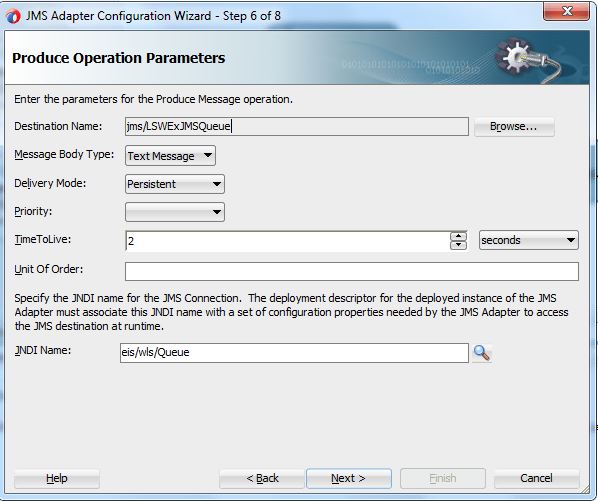

11. Now add the xsd, this is the same xsd which we have used to create the BPEL process, click next post that.


12  Now review the setting and finish it, it will create  JSM adapter in the background for you. 


13. Once adapter come on canvas join it with BPEL process, with wire it should look exactly same as given below.


Consumer JMS Services

1. Now we are creating one more  adapter this is for consuming the message been queued by the first adapter.


2. Name the adapter as given blow, please keep in mind we are creating this adapter for the message consumption, for the message created using the JMS adapter.

3. Select the provider as weblogic and click next.


4.. Now select the connection, this is same connection we created and selected in this exercise and click next. 


5.Now operation we are going to perform is Consume message select as required and then click next.
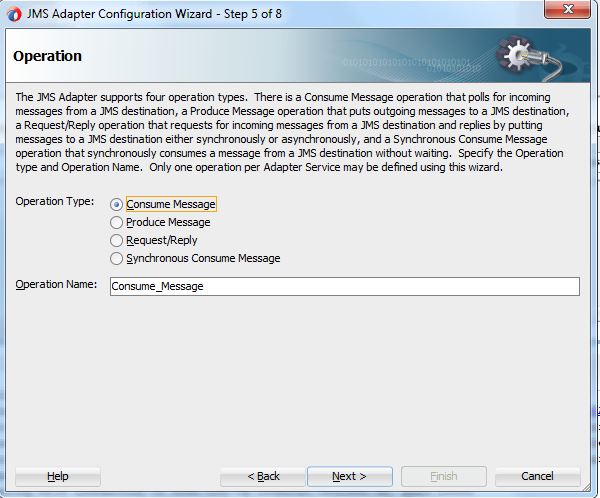

6. Select the queue which is going to be used and then click next. 

7.. Now choose the xsd, from the project, its expected structure of the message,  once selected click next.


8. Now click finish and then Jdeveloper will create the JMS adapter for you.


9. Add one more BPEL with the same input type and wire it with the consumer JMS adapter. Now deploy this composite on SOA server and your project is ready to test.


Testing of Composite


1. Go yo you composite and select it and click on it.


2. Click on the test service button and then input the parameter and click on test button. 

3.  Check the flow trace you will be able to see both consumer and producer. 


Saturday, 27 August 2016

Oracle SOA 12C - Database Adapter calling complex plsql (Part 3)

Oracle SOA 12C - Database Adapter (Part 3)


This is a continuation post for the post 1, and post 2 where we call the database adapter with just one table configuration. 

 In this post we will discuss  about calling a complex with type. 


Calling  plsql procedure with Complex Types

  Some time we need to call the plsql procedure with complex parameter like records, records you can think of collections in java where entire record or records can be sent to database, its a great way you can send entire collection of employees for creation.

 The problem with BPEL is it cant work with the complex record parameters directly.  Hence when you try to create a DB adapter then it will create a wrapper PLSQL package.  This package will talk to plsql and  BPEL. In short it will be a communication channel which will make the complex type readable for the BPEL.

Our experience says that you should use table as a record type
, else if there is any change in the table structure, soa will throw some unnecessary errors, which is hard to debug.   


In this post expectation is that you have completed the post 1 and post 2, if not please go through that, we are not going to cover database configurations and weblogic configurations. 

first create a plsql procedure to create an employee. This procedure should take all parameters. If you are not very families with plsql then copy the code from the example and compile. 


Now once the code is compiled use the following steps to complete

1. Create a new SOA project and add a BPEL to this composite. Use Employee.xsd (given in application) for inputs and output for BPEL


2.  Once this BEPL process is ready then create the database adapter with the help of the below steps and then added it to BPEL process. 


    a) Name the Adapter


   b) Choose the connection.

c. Select for the plsql procedure and then click on next.

 d. Choose schema and then click on browse button.


 e. Now select the procedure as given below and click ok.


 f. Now give a name to the wrapper plsql procedure, it will create the wrapper file with the same name. No accept default and click next for all the other steps.

g. Click Next.

h. Click Next, 

i. Click on finish. Once finish you can, 2 new sql file will be created to create a new package, which will be used an adapter. These files need to be compiled on each and every database, where this procedure is suppose to run on each and every database where this process is going to be deployed.


BPEL and Composite changes.


 1) Once done with the DB Adapter creation, create a wire between the db adapter and BPEL, it will look like as given below.


    2) Browse the BPEL and create a  Invoke activity to call the database adapter and then a transformation feed the data. See the project for more details.


    e)  Now do the transformation, Once its done then add a Transformation to assign the values to the Database plsql procedure.


Now application is ready for the deployment, deploy the application and then test it with the payload given in the project by us.


Running the application:-

 Once application is deployed then now use the payload and press Run. Once its done then  press the launch flow trace. It will provide you entire trace of the activities got executed.


2. Now see the response message, this process is design to return you new employee Id, and success message.


3.  You can ensure using sql sheet to check if row is inserted or not.


Download Link.

   Please use the download link


Exercise :-


Add one more procedure to which accepts employee records and provide if this employee exists or not in status and you need to either create an employee based on the results or not.


Tips:

=> If sometime your application give unnecessary errors, run the process one more time or restart the server.

Happy to take any question in this.

Oracle SOA 12C - Database Adapter calling plsql (Part 2)

Oracle SOA 12C - Database Adapter (Part 2)


This is a continuation post for the post 1, where we call the database adapter with just one table configuration. 

 In this post we will discuss  about calling a simple plsql.


Calling  plsql procedure

  When we need to call a simple plsql, its almost similar to the fist post. Only change will be we need to configure the plsql procedure call while configuring the database adapter. Also one more thing if we are configuring plsql adapter for the procedure or function call, we will not be able to reuse a adapter. 

 Which mean for each and every call to procedure we need to create separate database adapters. Hence your design should be minimum calls. we need to think and need complete the activity in one or two procedure calls. In a procedure again you can call multiple procedure. But SOA to plsql traffic we need to minimize. 

 If you are adding the new parameters to the plsql procedure then no need to re-create it just to next-next and dbadatper will be updated with the new parameters. 

In this post expectation is that you have completed the post 1, if not please go through that, we are not going to cover database configurations and weblogic configurations. 

first create a plsql procedure to create an employee. This procedure should take all parameters. If you are not very families with plsql then copy the code from the example and compile. 


Now once the code is compiled use the following steps to complete

1. Create a new SOA project and add a BPEL to this composite. Use Employee.xsd (given in application) for inputs and output for BPEL


2.  Once this BEPL process is ready then create the database adapter with the help of the below steps and then added it to BPEL process. 

                a) Name the Adapter
 
  
           b) Choose the connection.


    c) Browse the schema and procedure you want to execute. It will show you input and output parameters


    d) Now click ok.

  e)   Now keep he default and say next.


3. No add the wire between the db adapter and BPEL so that we can call from the BPEL.


4. Now use invoke activity,to call the plsql procedure and the create two variable one for inputs and then output.


5. Now do the transformation, Once its done then add a Transformation to assign the values to the Database plsql procedure.


Now application is ready for the deployment, deploy the application and then test it with the payload given in the project by us.


Running the application:-

 Once application is deployed then now use the payload and press Run. Once its done then  press the launch flow trace. It will provide you entire trace of the activities got executed.


Once done then check the database for the new employee.


Download Link.

   Please use the download link


Exercise :-


Add one more procedure to remove the employee and then remove if salary is more then 5000 post addition.